
Website load time refers to how long it takes the web browser to open the site after you’ve clicked on it or typed it into the address bar. Unfortunately, for many websites, load time doesn’t always get the attention it deserves. In fact, load time is more important than many people realize. In this article, we’ll explore this topic in more depth. Of course, we’ll also discuss how you can reduce load time and what load times are currently considered acceptable.
What is an acceptable load time?
In general, a load time of one to three seconds is considered acceptable. However, a maximum of two seconds is preferred. Furthermore, it is important to note that load times on a smartphone should be faster than on a desktop, as mobile internet connections are often slower when on the go.
2–3 seconds is a good target, yet many websites still have a load time of more than five seconds. So if you make it a priority to keep your website’s load time under two seconds, you can set yourself apart from your competitors.
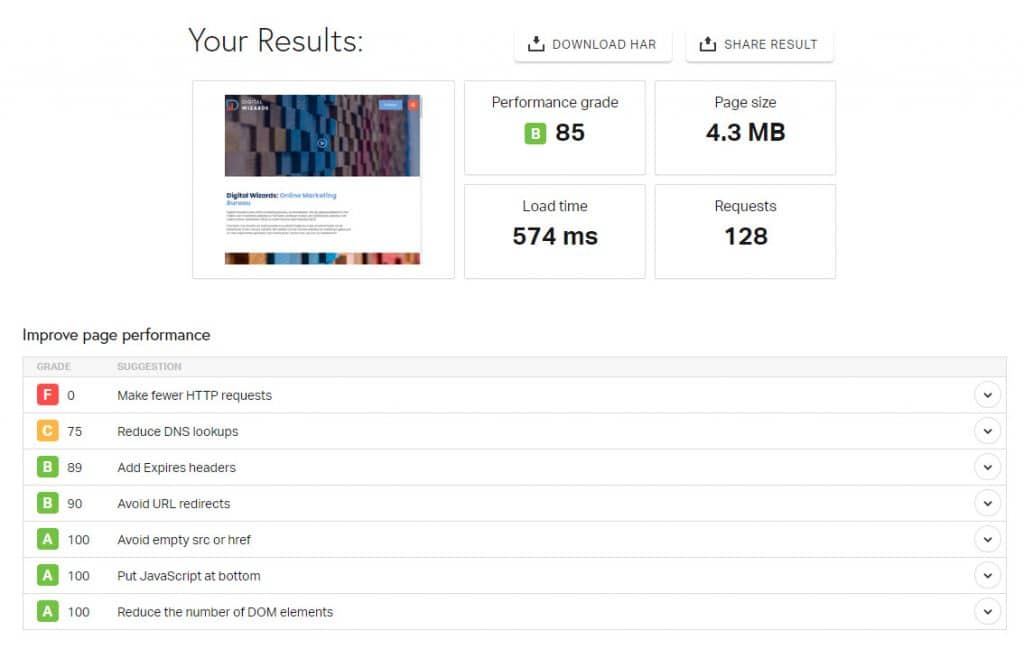
The Digital Wizards website scores more than adequately in terms of load time. Looking at the homepage, this page loads in just under 0.6 seconds, which is fast, especially considering that a video is also loaded in the header:
The importance of fast loading times
Minimizing your website’s load time has two main goals:
1. Customer satisfaction
The most obvious goal here is to maintain or even increase customer satisfaction. After all, the average internet user is very critical and has come to expect fast websites. A user simply wants to find what they’re looking for as quickly as possible.
If a consumer encounters a slow-loading website, they will click away without hesitation, and may never return. A slow website can therefore simply cost you customers.
2. Load Time for SEO
Furthermore, load time is a key ranking factor for SEO. Search engines like Google significantly favor fast websites over those with long load times. Therefore, optimizing your site’s load times is essential for your online visibility. Read on to learn how to do that.
Tips for improving website load time
There are numerous ways to reduce your website’s loading times. Below are some of the steps you can take to achieve this:
- Start testing to find out how fast your website loads. There are various free tools on the market that show you your load time, for example:
– Pingdom Test: https://tools.pingdom.com/
– Google PageSpeed Insights: https://pagespeed.web.dev/ - Check the size of the images on your website, especially on subpages that load more slowly. An image should ideally be no larger than 15–50 KB. Much larger images cause unacceptably long load times. Fortunately, resizing images isn’t difficult. You can do this with various photo editing programs such as Pixlr.
Tip: Read our article on resizing photos with Pixlr. - You can also use a tool like Imagify or Smush PRO to reduce the file size even further.
- Have the website code checked, and ensure that, for example, the CSS or JavaScript code isn’t unnecessarily long. Note that if you’re working with a WordPress theme website, you should assume this isn’t possible.
- Opt for a custom-built website so that the code is as concise and optimized as possible. WordPress theme websites tend to be cost-effective, but the code is often poorly implemented and quickly becomes outdated. Optimizing a theme-based website is nearly impossible, meaning you’ll always end up with a slow website in terms of code performance.
- Check to see if you’ve implemented all the updates offered. If not, be sure to apply them. As time goes on, WordPress releases updates to comply with Google’s latest requirements—you don’t want to miss these updates.
- Check whether you have any unnecessary information and/or tools, such as plugins, on your website. Plugins that add scripts or code, in particular, can slow down your site.
- Optimize your website’s caching. This improves the temporary storage of standard files on your website, such as the layout. In that case, it may take longer for your website to load the first time, but subsequent pages will load faster.
- Use lazy loading with plugins such as WP Rocket.
In short, optimizing your website’s loading time is highly recommended. Not only does it ensure satisfied and returning customers, but it also improves your website’s organic discoverability.