
If you want to advertise automatically on Marktplaats or other shopping channels such as Google Shopping, you need a data feed management tool. With a data feed management tool like Channable, you can edit the source feed from a webshop in a structured way and organize it into new data feeds for the channels you want to connect. In this article, we explain what Channable can do for your webshop.
What is data feed management
With data feed management, you process your online store’s source feed and organize it into one or more data feeds. Within WooCommerce, there are various plugins that allow you to convert product data from your online store into a data feed. An XML file is the most commonly used format, but you can also choose to export your data feed in other file formats. Examples include:
- CSV
- JSON
- TSV
- TXT
- XLS
- XML
When exporting your data feed from an online store, it is recommended to include as many product fields and attributes as possible in the data feed. Here is an example of a plugin that is widely used in WordPress for WooCommerce online stores:
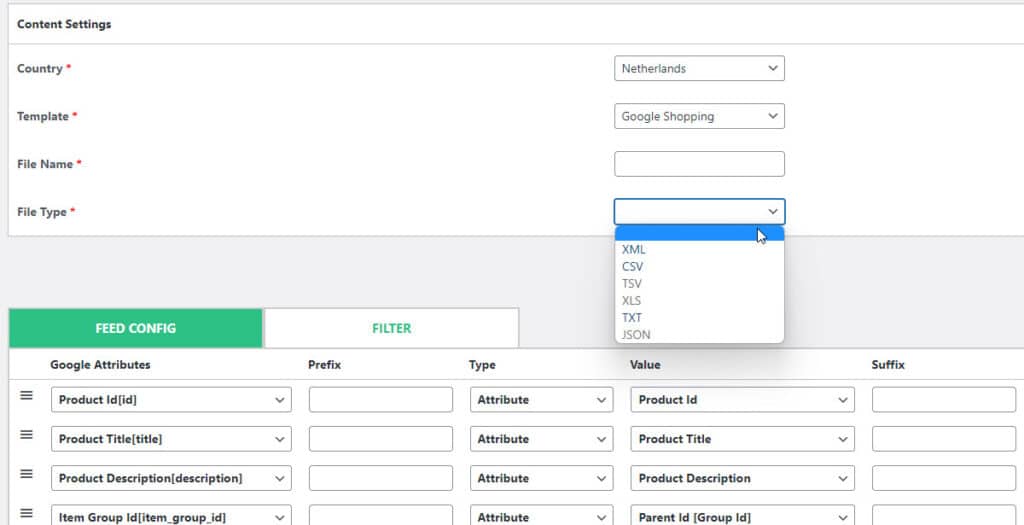
Why data feed management?
Marketplaces and shopping channels such as Google Shopping offer additional reach in terms of traffic as well as extra revenue opportunities. With more than 10 products, it’s simply impossible to manually track and update all these channels. A data feed management tool is usually linked to your online store via an API, allowing you to select specific fields from your product data.
You can use this data to advertise on relevant channels and to further refine your products. Data feed management tools are compatible with most e-commerce platforms such as Shopify, WooCommerce (WordPress), and Magento. In addition, product data is downloaded for you daily—or multiple times a day—so you can always share the most up-to-date information.
Benefits of data feed management
- Product information is updated automatically. When you add a new product or modify an existing one, this information is automatically updated across all channels using the data feed management tool.
- You can manage multiple data feeds from a single location. This ensures you have a clear overview and don’t have to make the same adjustments multiple times.
- Because a large portion of the tasks is automated, this eliminates the need for many manual actions. Our experience shows that this not only saves a lot of time but also reduces the number of errors.
- Optimizing your products and ads will improve your visibility by allowing you to connect new channels. Additionally, this is also beneficial for SEO, which will lead to even more traffic. Ultimately, this will result in more customers, which is good for your revenue.
- Data feed management tools allow you to customize your data feed and enrich your input. For many shopping channels, it is essential to provide comprehensive product data. Simply uploading an image, price, and description is not enough. With a data feed management tool like Channable, you can create detailed rules that enrich your data feed.
Why use Channable?
As mentioned, there are several advantages to working with a data feed management tool. At Digital Wizards, we have been using the Channable tool for years. Channable was one of the first data feed tools to offer extensive features at an affordable price. For a new online store, Channable is already accessible because the starting price begins at €29 (starter plan with up to 500 products). Over the years, Channable has significantly expanded the tool, making it a very attractive option for large online stores and SEA agencies as well.
Benefits of Channable
Here are some of the benefits of Channable at a glance:
- Channable offers excellent and fast support. This is particularly beneficial for new online stores, as Channable assists with setting up your data feed.
- Channable’s user interface is intuitive and very user-friendly. Data feed rules can be managed at the master level and applied to other online stores/channels within your account. This is very convenient and saves a lot of time when setting up and managing data feeds.
- Channable is available for small online stores, as well as for large, internationally operating online stores. In addition, Channable offers excellent support for SEA agencies.
- Channable’s rates vary depending on volume and usage. For example, if you have 5 online stores with multiple channels and a large number of products in your data feed, you’ll pay significantly more than a new online store. The tool is more expensive at higher volumes, but in our experience, it’s still reasonably priced.
Channable pricing
These are the prices for Channable effective as of May 1, 2022, for monthly payments:
- Small Business: starting at €29 per month
- Medium Business: starting at €49 per month
- Large Business: starting at €99 per month
- XL Business: starting at €149 per month
- XXL Business: starting at €279 per month
- Small Enterprise: starting at €499 per month
- Medium Enterprise: starting at €699 per month
- Large Enterprise: starting at €1,199 per month
- XL Enterprise: starting at €1,999 per month
- XXL Enterprise: starting at €2,799 per month
View Channable’s current pricing here.
E-commerce and data feed management
In a world where online marketing and e-commerce are gaining ground, it’s important that your website is optimized to compete with rivals. That’s why it’s important to use a data feed management tool like Channable to quickly update all your information. This ensures your products are displayed on the relevant advertising channels, allowing you to reach your target audience even more effectively.
Want to learn more about data feed management and SEA?
Want to learn more about data feed management and how to apply it to SEA? Check out our other blog articles or contact Digital Wizards to find out what we can do for you!