
SEA and SEO both influence your online discoverability. Success with SEA and SEO starts with proper preparation. Consider, for example, the effective collection of data, including high-potential keywords and a competitive analysis.
Keyword research
A keyword research analysis reveals which search terms your potential customers frequently enter into Google. You can then incorporate frequently used search terms into your website in various ways. Ideally, you want to conduct keyword research in a way that gathers insights for both SEA and SEO. After all, you want to know what it would cost to secure paid positions for your target keywords, but also immediately understand the competition for those same keywords in SEO.
But here’s the thing: how do you actually figure out which search terms are frequently used? There are various paid tools available, but fortunately, there’s also a very good free tool: the Google Keyword Planner. Below, you’ll learn how to use this handy program and why it can be beneficial for you.
Using Google Keyword Planner
Before you actually start using Google Keyword Planner, it’s advisable to brainstorm on your own first. During this brainstorming session, ask yourself: what search terms do you think your potential customers will enter into Google? What services and products do you offer, and where would you like your website to rank higher?
During your brainstorming session, note down the keywords that come to mind in a keyword overview. Vary the length of your search terms, so include both short, single-word terms and longer search terms consisting of short phrases or questions.
Tip: Also look at the keywords your competitors use on their websites and add them to your keyword list.
After your brainstorming session, it’s time to really get started with Google Keyword Planner. To use this program, you’ll need a Google Ads account. Once that’s set up, you can begin. Go to “Tools & settings” and then “Planning” to find Google’s Keyword Planner:
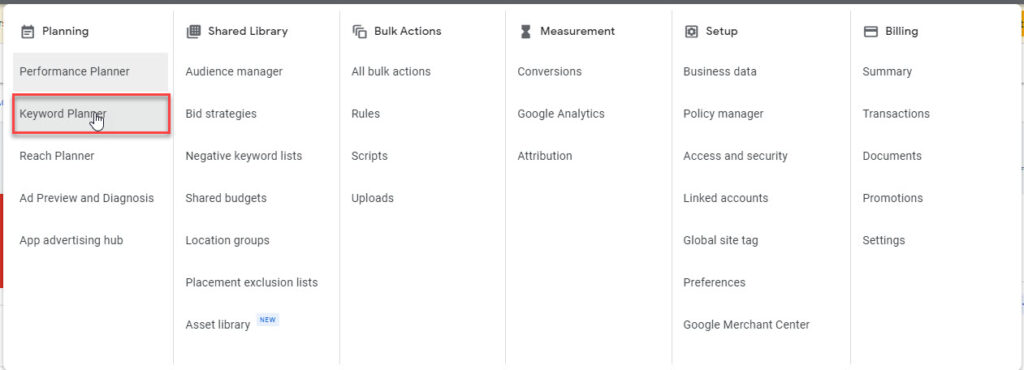
We often choose ‘Discover new Keywords’ => here you can submit your collected search terms, after which you can see how much search volume a search term has. Interesting point: if your keyword doesn’t rank well, Google will provide matching alternatives that are frequently entered.
5 Tips for Google Keyword Planner
- Tip: You can enter up to 10 search terms at a time. So make sure to group as many similar search terms as possible into categories. Suppose you have an online marketing agency in Amsterdam that offers SEA and SEO support. In that case, you’ll first want to identify all terms related to online marketing, such as: [online marketing], [online marketing amsterdam], and [outsource online marketing]. You can then collect these search terms into a single search batch.
- You can search nationally in the Google Keyword Planner, but also locally. This is very useful if you want to implement a local SEA or SEO strategy.
- If you’re searching locally—for example, for all information regarding online marketing in Haarlem —make sure to run this as a search batch.
- Have you entered your search terms and want to work with them further? You can download the data in .csv format or send it to your Google Sheets.
- Ideally, cover a full year from January through December. You’ll then be able to see various annual trends in this data. This also makes it easier if you want to merge multiple files later: they’ll all have the same date range.
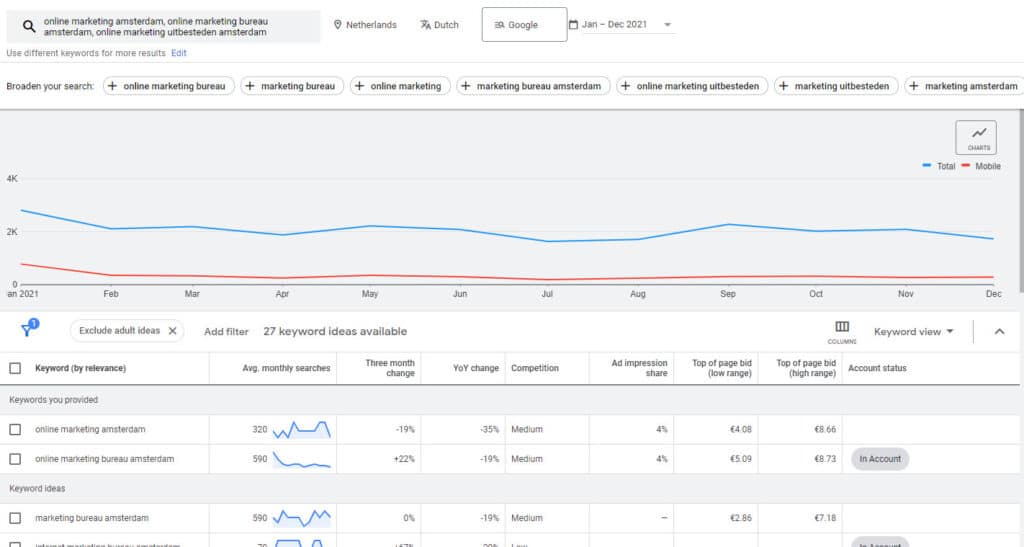
Benefits of Google Keyword Planner
By now, it should be clear: Google Keyword Planner is an ideal platform for identifying your most important search terms, one way or another. All in all, Google Keyword Planner offers the following benefits:
- Google is, of course, the go-to source for the best insights on search volumes, competition for search terms, and expected costs.
- Unlike other tools, this one is completely free, though there is an indirect revenue model for Google if you spend (more) money on Google Ads, of course.
- With the Google Keyword Planner, you can quickly gain insight into how often certain specific search terms are used.
- Google Keyword Planner provides you with alternative keywords (with a similar meaning) for the search terms you enter. This tool may even suggest terms you wouldn’t have thought of yourself.
- You can also edit and copy lists of search terms using Google Keyword Planner.
- You can also immediately use the keywords you save within your Google Ads account in existing campaigns or new ones you create.
In short, the Google Keyword Planner is a suitable tool for SEA and SEO data. Whether you’re a self-employed entrepreneur or work at an online marketing agency, this tool offers valuable data for every type of user. Plus, the tool is free, which is, of course, a nice bonus.