For your website or online store, your goal is to rank as high as possible in search engines. But what if your own website turns out to be your biggest competitor? That is the problem of keyword cannibalization: when multiple pages on your website compete for the same keywords and unintentionally weaken each other. Instead of one page standing out strongly, all pages are undermined by their own competition. In this article, you’ll discover exactly what keyword cannibalization is, why it’s a problem, and how you can use SEO tools like Ahrefs to detect and fix it.
What is keyword cannibalization?
Keyword cannibalization occurs when two or more pages on your website target the same keyword or a very similar search term. This prevents search engines from properly determining which page is most important, potentially causing them to rank all pages lower in the search results.
Some common causes of keyword cannibalization are:
- Blogs or articles covering the same topics.
- Multiple product pages targeting the same keyword.
- Landing pages that target overlapping search intentions.
- Category pages that can be confused with blog content.
- Why is keyword cannibalization a problem?
Disadvantages of keyword cannibalization
- Lower rankings: Instead of a single page ranking highly, search engines may choose to rank multiple pages lower.
- Less organic traffic: Since your rankings are lower, you may be missing out on traffic that you could otherwise have attracted with a single strong page.
- User confusion: Visitors may have difficulty finding the information they need if multiple pages offer similar content, which can lead to a poor user experience.
Identifying keyword cannibalization with Ahrefs
Ahrefs offers a powerful set of tools you can use to detect and resolve keyword cannibalization. Here are the steps:
Step 1: Use the “Site Explorer”
Start by entering your domain name into Ahrefs’ Site Explorer. This will give you an overview of your website and allow you to analyze in depth how specific pages are performing.
Step 2: Check for overlapping keywords
Go to the “Top Pages” tab to see which keywords are ranking for specific pages. Here, you can look for repeated keywords or phrases across different pages. This is often a sign of cannibalization.
Step 3: Look for declining performance in the “Positions” report
Under the “Organic Keywords” tab, you can check whether multiple pages are competing for the same keywords. If you notice that different URLs are ranking for the same keyword, that’s a strong sign of cannibalization.
Step 4: Use the “Content Gap” feature
Another powerful way to identify cannibalization is through the “Content Gap” analysis. Here, you can search for keywords on which your website is not performing well, which can help you detect pages that are not optimally structured and may be causing cannibalization.
Step 5: Use “Site Audit” for technical SEO
With Ahrefs’ Site Audit feature, you can gain in-depth insight into your website’s structure and any technical issues that may contribute to cannibalization.
Steps to resolve keyword cannibalization
Now that you know how to detect keyword cannibalization, it’s time to take action. Here are some ways to solve the problem:
- Combine content
If you have two or more pages that overlap significantly in their keywords and content, consider merging the content into a single powerful, comprehensive page. This can help both users and search engines find a single, clear page. - Change the search intent of the pages
Sometimes it is not possible or desirable to merge content. In that case, you can try to adjust the search intent for each of the competing pages. Ensure that each page serves a specific search term and search intent to differentiate itself. - Use 301 redirects
If you have old pages that are no longer relevant or that overlap significantly with a new page, you may want to consider setting up a 301 redirect. This tells search engines to pass the value and authority of the old page to the new page. - Optimize your internal link structure
Ensure that your internal links lead to the page you consider most important for a specific keyword. By optimizing internal links, you provide search engines with additional clues about the hierarchy of your content. - Add unique elements to competitive pages
Add distinctive elements such as specific subtopics, unique media, or targeted keywords to give pages that may overlap more depth and unique value.
Result: Resolving keyword cannibalization
What are the benefits of resolving keyword cannibalization? For our own website (Competencies Examples), we merged two pages and set up a 301 redirect to the page that performed best. In just one week, we’ve seen improved rankings, new search terms we’re ranking for, and already over 200 more visitors from SEO:
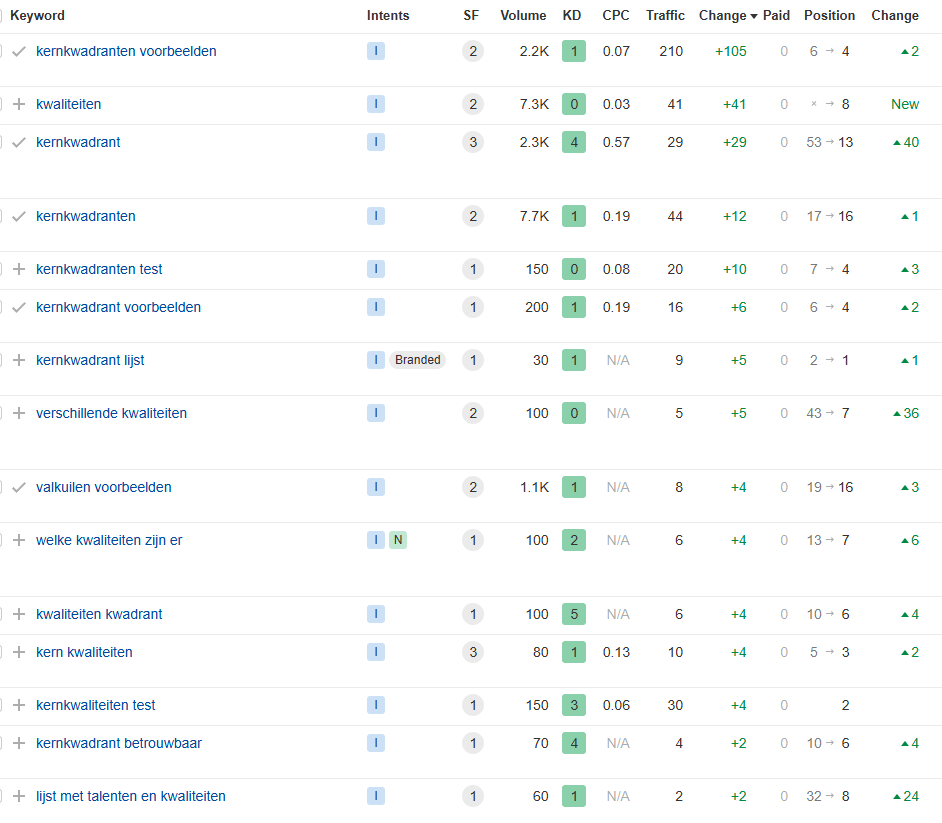
Example: Result of resolving keyword cannibalization
Preventing keyword cannibalization
While identifying and resolving keyword cannibalization is important, prevention is, of course, even better. Here are some tips to ensure that cannibalization doesn’t become a problem again:
- Create a keyword strategy and content calendar: Plan content with unique keywords and topics.
- Conduct regular SEO audits: Use Ahrefs, SEMrush, or other SEO tools to regularly review your content.
- Involve your team in your SEO goals: Ensure that all content writers and SEO specialists clearly understand which keywords are used where.
Summary on keyword cannibalization
Keyword cannibalization can have a major impact on your website’s SEO performance, but with tools like Ahrefs, you can quickly and effectively identify and resolve the issue. By combining content, clarifying search intent, and optimizing your internal link structure, you can ensure that your website performs better and that every page contributes effectively to your SEO strategy.
With this approach, you can stay on top of keyword cannibalization and let your website reach its full potential.