
About Google Shopping
These days, online shopping is the most normal thing in the world. You can order everything online, from clothing to groceries. Sometimes you might not be looking for a specific brand, which leads you to hop from website to website. Price comparison sites where you can filter by specifications or brands come in handy in such cases. A well-known price comparison site is, of course, Google Shopping, which is essentially part of Google’s search results. In this article, we’ll tell you more about Google Shopping and why it’s a growth opportunity for your online store.
What is Google Shopping?
Within Google, there are several ways you can advertise. This can be done with standard text ads, but also with product ads. At Google, this is called Google Shopping, which you’ve undoubtedly come across before. Google Shopping is a Google service that allows consumers to search for, compare, and purchase products. Sellers pay per click to have their products displayed in this section of Google’s search results.
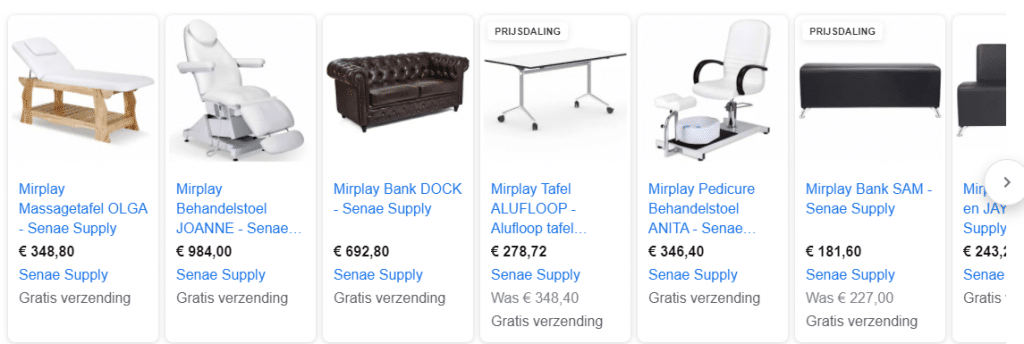 Example Google Shopping result
This Google service falls under SEA and is run through Google Ads and the Google Merchant Center. A major difference between Google Shopping and other Google Ads campaigns is that it isn’t based on keywords you specify in advance. Instead, it works with a product feed that you edit using, for example, Channable. A product feed consists of your products, including product photos, product descriptions, and prices. Based on your product data, online store, and bids, Google determines whether to display your products for certain keywords.
How does Google Shopping work?
As soon as a consumer enters a search term related to a product, Google displays a list of products from various sellers. Unlike text ads, you can show what you’re selling at a glance.
Before you can get started with Google Shopping, there are a few things you’ll need:
- A Google Ads account, where you build your campaigns.
- Google Merchant Center account, where you upload your product feed.
- A product feed containing the products and product specifications you want to advertise.
- Ideally, a product feed management tool like Channable where you can quickly and easily apply feed rules. Think, for example, of quickly updating multiple titles or adding values to additional fields.
Once the points above are in order, Google Ads and Google Merchant Center must be linked to create your campaign. When setting up a campaign, you select the bidding strategy, daily budget, and feed priorities. The goal here is to find the right balance for a high conversion rate.
Types of Google Shopping campaigns
Google Shopping has changed significantly over the years. Whereas you used to choose between standard Shopping campaigns and the automated Smart Shopping campaigns, the latter has now been merged into Performance Max. Currently, you have roughly two options.
Standard Shopping campaigns
Here, you retain more control. You determine the campaign structure, the bids, and which products you place in which group. This gives you insight and control, but also requires more manual effort and expertise.
Performance Max
Performance Max is Google’s modern, automated campaign format and the successor to Smart Shopping. Instead of appearing only in the Shopping section, your product ads are displayed across multiple Google channels—the Search Network, Display, YouTube, Gmail, and Maps—through a single campaign. You provide Google with a product feed, a budget, and a goal—such as a desired ROAS—and the automation then determines where and to whom your ads are shown.
The advantage of Performance Max is reach and convenience. The downside is that you have less direct control and insight, and that the campaign requires good data and clear goals to perform well. A clean, complete product feed remains the foundation in both cases: without accurate product data, even the smartest automation has little to work with.
Google Shopping costs
You pay for Google Shopping ads through Cost per Click (CPC). This means you pay for every click on your ad. You can set the maximum amount you want to spend, so you largely have control over this yourself. Google Shopping also uses an auction system, where various factors determine the position. In short, Google Shopping costs depend on the advertiser.
Advertise more affordably through a CSS partner
By default, you advertise on Google Shopping via Google’s own Comparison Shopping Service (CSS). However, you can also run your Shopping ads through an external CSS partner. In many cases, you’ll pay less per click for the same positions because Google doesn’t include part of the auction margin when using an external CSS. For online stores with a substantial Shopping budget, this can result in a noticeable difference in costs. Whether it’s beneficial in your case depends on your volume and market.
Why Google Shopping?
There are countless benefits to Google Shopping. Below, we list a few of them:
- High visibility and presence
By using Google Shopping in addition to your text ads and SEO, you can appear multiple times in Google search results. - Insight into your performance
Through Google Shopping, you can view your performance metrics. Based on your benchmark data, you can determine how your ads perform compared to competitors’ ads. Additionally, you can see how often your ad is displayed to calculate the CTR. - Higher CTR
Depending on the search terms the user enters, your product will appear in Google’s Shopping section. Here, the user will immediately see photos, product descriptions, and prices, ensuring there are no surprises. - Higher-quality leads
Users looking for products you offer can make a purchase decision right away. If they then click on your ad and are directed to your website, they’re more likely to make a purchase.
Outsource Google Shopping?
Setting up Google Shopping may seem simple, but keeping it profitable requires ongoing work on your feed, your campaign structure, and your bids. If you don’t have time for that or want to ensure your budget is well spent, you can outsource it. Read more about how we handle this on our page about outsourcing Google Shopping.
FAQ about Google Shopping
What is the difference between Google Shopping and Performance Max?
Standard Shopping campaigns give you more direct control, while Performance Max runs on Google’s automation and displays your product ads across more channels. Performance Max is the successor to Smart Shopping and is currently used by many online stores.
How much does Google Shopping cost?
You pay per click (CPC) on your ads, and you set your own maximum budget. The final cost depends on your market, your bids, and the competition, since Google uses an auction system.
Do I need an online store for Google Shopping?
Yes. Google Shopping revolves around products with a price and a product page, so you need an online store and a product feed. For standalone services without products, regular search ads are more suitable.
What is a product feed?
A product feed is a file containing all your products and their details, such as title, description, price, image, and GTIN. Google uses this data to determine which search queries your products will appear for. With a tool like Channable, you can keep that feed complete and up-to-date.
What is a CSS on Google Shopping?
CSS stands for Comparison Shopping Service. You can run your Shopping ads through Google itself or through an external CSS partner, with the latter often being cheaper per click.
Want to learn more about SEA and Google Shopping?
Would you like to learn more about how we approach SEA and Google Shopping? Then contact Digital Wizards to find out what we can do for you!