
A sitemap can be viewed as a web page listing all the pages contained within a particular website. You can compare this to a table of contents in a book. As a visitor, you can usually find the link to such a sitemap at the bottom of the homepage; this is an HTML sitemap. In addition, there is also a sitemap intended for search engines, the XML sitemap.
Later in this article, you’ll learn in which situations a sitemap is particularly useful or even necessary. We’ll also describe how to create a sitemap and how to submit it to Google. But first, for the sake of completeness, we’ll explain the differences between the two types of sitemaps.
Two types of sitemaps
For the general public, the sitemap as described in the introduction above is likely the most familiar.
HTML sitemap
The sitemap described is also known as the HTML sitemap. This is a page that all visitors to your websites can access and view. In addition to listing all of a website’s subpages in a clear, organized manner on this sitemap, you can usually also identify the website’s clear structure here. This can be helpful for visitors to find specific information quickly and efficiently.
XML sitemap
In addition to the HTML sitemap, there is also the so-called XML sitemap. This sitemap is not accessible to visitors to your website but is intended to ensure good discoverability in online search engines. The XML sitemap is therefore primarily intended to improve organic discoverability, or SEO.
You can think of the XML sitemap as a collection of rules that help search engines find pages and other content. Google’s systems can read these rules, allowing them to accurately assess the categories, pages, and content of your website.
An XML sitemap is often divided into multiple sub-sitemaps composed of different page types or post types. Here is an example of the Digital Wizards XML sitemap:
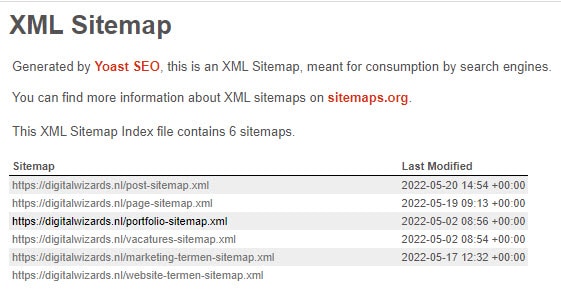
You can see that various page types are grouped together in the sub-sitemaps, such as online marketing job openings or marketing terms.
When is a sitemap useful or even necessary?
Not every website contains a generated XML sitemap, and that is not ideal for a website’s SEO. Additionally, a visible sitemap is necessary to clarify navigation on a website. Consider, for example, the following situations:
- If you have a very large website with a significant number of subpages, Google may have difficulty finding newly added or updated pages. This, in turn, could negatively impact your ranking and, consequently, your discoverability.
- When the internal link structure of your (large) website is not (yet) in order.
- If you have a new website, you likely have very few backlinks pointing to your site.
The main reason to create a sitemap is to improve your discoverability via online search engines. Subpages in particular should rank better as a result, partly because a sitemap makes you easier to find for the most essential keywords. How does creating a sitemap work? You can read about that in the next paragraph.
Here’s how creating a sitemap works
Fortunately, creating a sitemap is not a difficult task, especially if you use the right tools and/or plugins. Below, we’ll first discuss how to create an HTML sitemap, and then we’ll provide tips on creating an XML sitemap.
Create an HTML sitemap
If you use the WordPress content management system (CMS), it is best to install and use the WP SEO HTML Sitemap plugin. Once you have done this, create a new page and you can actually start creating your sitemap, which will be visible to the public.
Give this page a logical, recognizable title and publish it, even if it is still empty. Next, open the plugin mentioned above and adjust all settings to your liking. The plugin will then ensure a correct sitemap display. In addition, changes to your website are automatically reflected in your sitemap.
Create an XML sitemap
It is also recommended to download and use a special plugin for creating an XML sitemap. WordPress users are best advised to choose the Yoast SEO plugin for this. Once you have this plugin, go to SEO > General > Features and click “On” under XML Sitemaps. Before submitting an XML sitemap to Google, it is advisable to check it first.
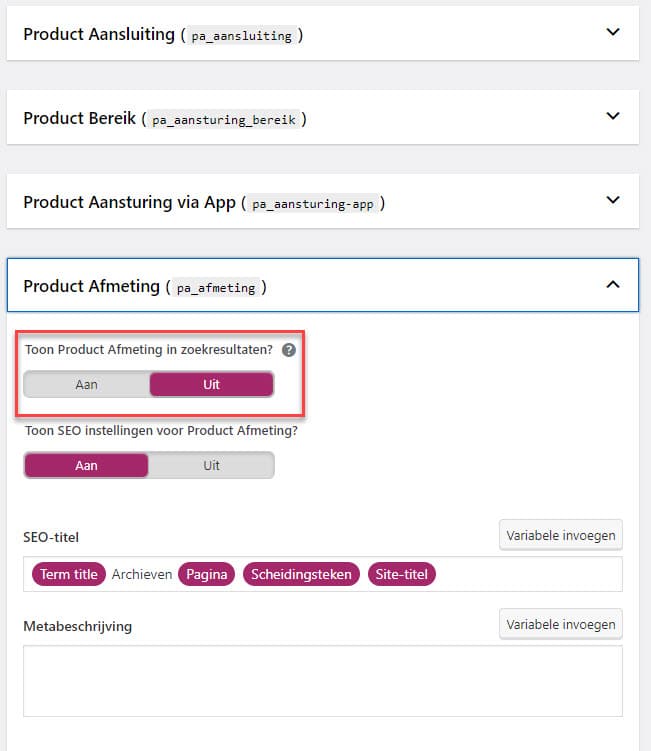
Tip: Check whether all sitemaps are necessary. The Yoast SEO plugin creates neat sitemaps, but also for types of pages you don’t want to be indexed. Fortunately, you can disable these:
Finally, there are also tools available online that allow you to automatically generate a sitemap. This seems incredibly convenient, but it also has a major drawback: this generation happens only once. That means that if you post new content on your website—something that is highly recommended for various reasons, including your online discoverability—you’ll also have to generate a new sitemap every time. With good plugins like the ones described above, that’s not necessary.
Submit your XML sitemap to Google
Once you’ve created an XML sitemap, you’re not quite done yet. You’ll then need to submit your XML sitemap to Google. Fortunately, that’s not complicated. You do this via Google Search Console. There, you first register your website as a whole, after which you can also add one or more XML sitemaps.
- To do this, open the ‘Sitemaps’ menu and then follow the instructions.
- When entering the so-called slug, keep in mind that you should only enter the part of the URL that comes after the domain name.
- After entering the information, you can check the sitemap overview (under Status) to confirm that it was successfully submitted.
- In Google Search Console, you can also immediately see any potential issues or error messages related to your sitemap.