Not everyone has the budget for a custom website and chooses to do it themselves. In this article, we’ll help you install WordPress on your own. WordPress is the most widely used Content Management System (CMS), and for good reason. The open-source nature of WordPress allows you to fully manage and customize your website yourself. Plus, you can use WordPress and many of the available plugins for free.
What do you need to arrange in advance?
Before you can install WordPress, there are a few steps you need to take:
- Arranging hosting: you need server space, also known as web hosting. You can rent this from various hosting providers.
- Suitable hosting package: make sure the hosting package you choose is compatible with WordPress. Most providers offer packages that meet WordPress requirements.
- MySQL database: You need a MySQL database to store your content, changes, and settings. You can create this database through your hosting provider.
- FTP client: An FTP client is required to upload files from your computer to the server. It serves as the connection between your computer and the server.
1.) Manual installation of WordPress
The manual installation of WordPress consists of the following steps:
- Download WordPress: go to the official WordPress website and download the program.
- Extracting files: extract the files from the downloaded ZIP file.
- Create a database and username: use your hosting provider’s control panel to create a username and a database.
- Edit the configuration file: locate the file wp-config-sample.php, open it with a text editor, and enter the correct database information. Then rename this file to wp-config.php.
- Uploading files via FTP: upload all necessary files to your server using an FTP client.
- Run the installation file: go to the installation file in your browser and follow the instructions to install WordPress.
2.) Automatic installation via your hosting provider
Many hosting providers offer an easier way to install WordPress through their control panel. This can save you a lot of time and effort. Instead of going through all the steps above, you can have WordPress installed automatically with just a few clicks.
This process usually proceeds as follows:
- Log in to your Control Panel: Log in to your hosting provider’s control panel.
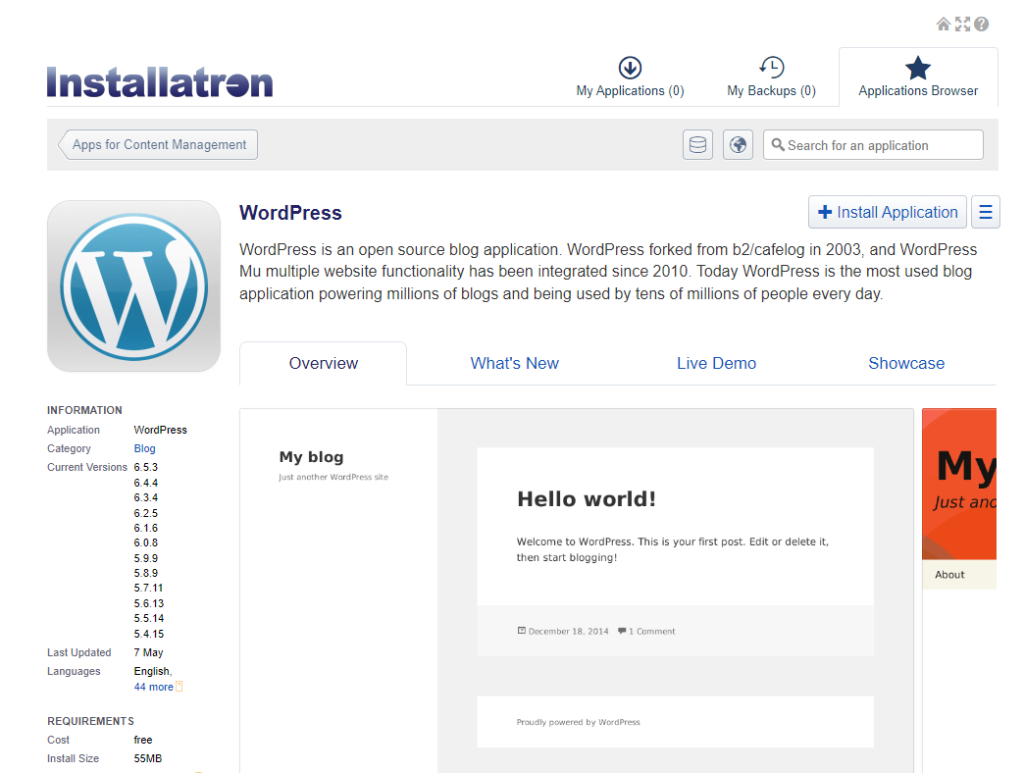
- Search for WordPress Installation: Look for the option to install WordPress, for example via Installatron; see the example below.
- Follow the instructions: Follow the simple steps to install WordPress. Your WordPress website will be ready to use in just a few minutes.
With this knowledge, you can now decide which installation method suits you best. Whether you choose manual installation or the automatic option through your hosting provider, you are now well-prepared to set up and manage your own WordPress website. Good luck!